CE Assessment & TIA

XER
Inspector

A decision-support platform for NEC Compensation Event assessment. Upload your Primavera P6 programme, run full CPM scheduling, and turn complex programme impact analysis into a contract-ready quotation — in minutes, not hours.

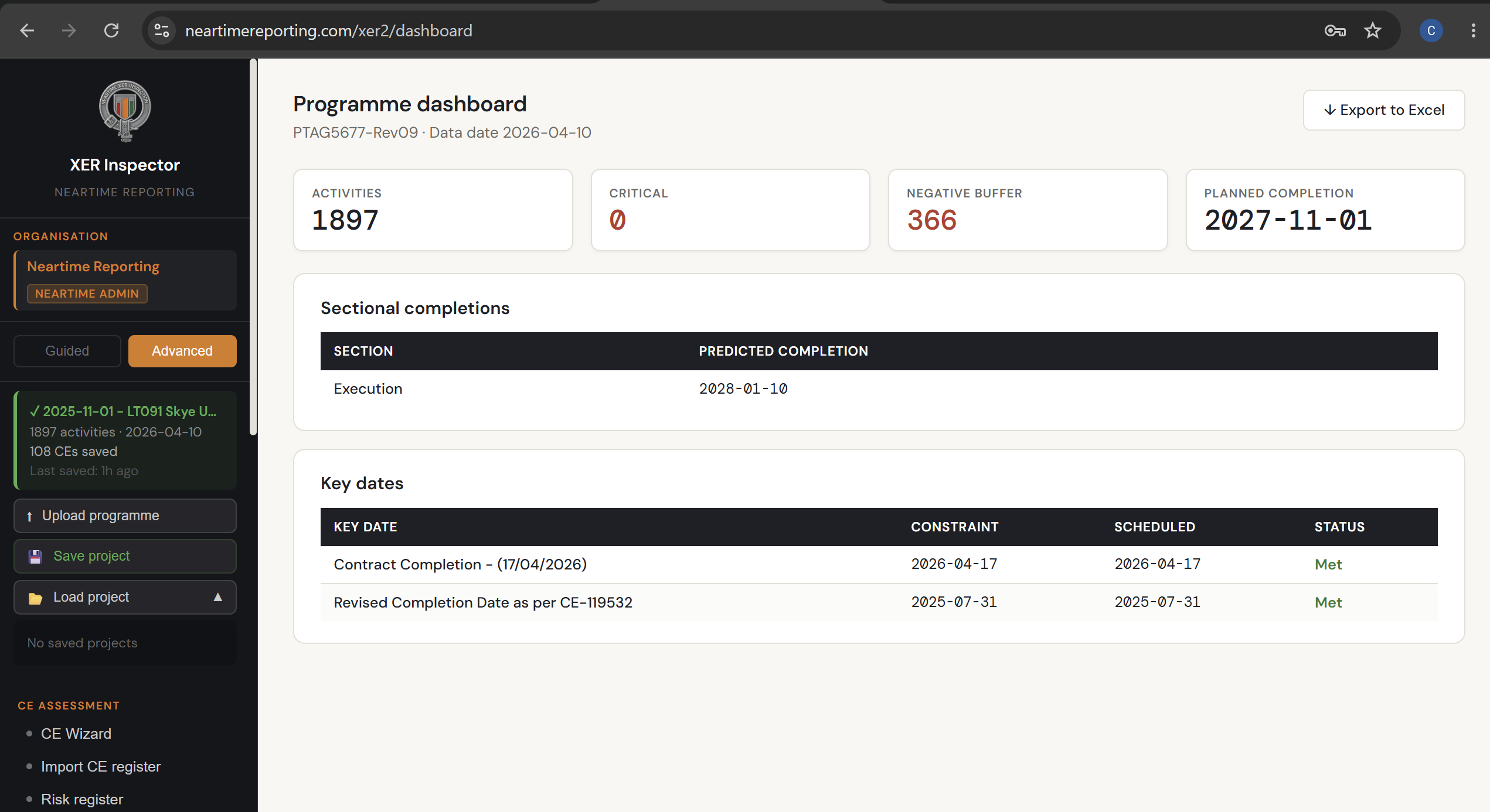
Programme Dashboard
Activities
1,897
Critical
0
Negative Buffer
366
Planned Completion
2027-11-01
Key Dates
Contract Completion — 17/04/2026Met
Revised Date — CE-119532Met
Programme-based CE assessment, done properly

XER Inspector is a web-based decision-support tool purpose-built for commercial managers, quantity surveyors and planners working on NEC3/NEC4 contracts in UK infrastructure. It automates the technical heavy lifting of programme-based Compensation Event assessment — turning a Primavera P6 programme into defensible, contract-ready analysis in minutes rather than hours.

The platform reads your live P6 programme file, runs full Critical Path Method scheduling, and applies NEC-clause-aware logic to model the time and cost impact of changes — whether that's a single Compensation Event, a "what-if" scenario, or a full multi-event Time Impact Analysis.

NEC contracts demand that CE impact be evidenced against the accepted programme, not asserted. XER Inspector gives you a robust, repeatable and auditable way to do exactly that — producing professional output suitable for direct inclusion in a CE quotation, EOT claim or commercial negotiation, without manually re-running CPM logic in a spreadsheet.

Built by a quantity surveyor for quantity surveyors, validated against real NEC4 ECC project data.

Open XER Inspector
XER Inspector CE Wizard

From single CE to full cumulative TIA

Six core workflows cover the full range of NEC programme-based assessment, from a quick individual CE to a complete multi-event time impact analysis.

CE Wizard

A guided, step-by-step assessment for any individual Compensation Event. Break a CE into its constituent activities, see exactly how it lands on the programme, and generate a fully formatted CE Quotation — ready to issue.

Scenario Builder

Build "what-if" programme scenarios by applying corrections and CEs together, then visualise the result on a baseline-vs-revised Gantt chart. Save, reload, duplicate and compare scenarios as positions evolve.

Cumulative TIA

Assess multiple Compensation Events together, in sequence, against a single corrected baseline — the NEC/SCL-recognised methodology for demonstrating genuine cumulative effect and flagging concurrent delay.

Scenario Comparison

Set two assessed positions side by side — for example, the Contractor's case against the Project Manager's — and see precisely where and why the analysis diverges.

Programme Drift Analysis

Compare two actual programme revisions to track how the contractor's plan has genuinely changed over time, independent of any specific event.

Retrospective Analysis

Reconstruct historic programme positions and assess delay after the fact, with a guided correction and mapping workflow for retrospective claims.

Why it matters

NEC contracts demand evidenced CE impact, not assertion. XER Inspector gives you the rigour to back up your position — and the speed to do it without re-running CPM logic by hand.

Live P6 programme analysis

Upload your .xer file directly and run full Critical Path Method scheduling — no manual re-entry, no separate planning software required.

Sectional completions & Key Dates

Full support for multi-section NEC contracts, with separate completion tracking per Section and automatic flagging when a scenario causes a Key Date to be missed.

Activity register & programme dashboard

Full activity-level visibility with float, criticality and Excel export, plus a live programme health overview showing critical paths and negative buffer.

Contract-ready report output

Generate NEC-formatted reports — CE impact, TIA, programme acceptance, scenario summary — suitable for direct inclusion in a quotation or claim.

Concurrent delay flagging

The Cumulative TIA workflow isolates which events drove the Completion Date, which were absorbed by float, and flags potential concurrent delay for review.

Guided or advanced workflow

Switch between a guided step-by-step wizard for quick assessments, or an advanced mode for full control over programme corrections and scenario logic.

See XER Inspector in action

Screens from the live XER Inspector platform. Get in touch to arrange a full walkthrough.

XER Inspector programme dashboard
Programme Dashboard

Live overview of the uploaded programme — activity count, critical activities, negative buffer, sectional completions and Key Date status at a glance.

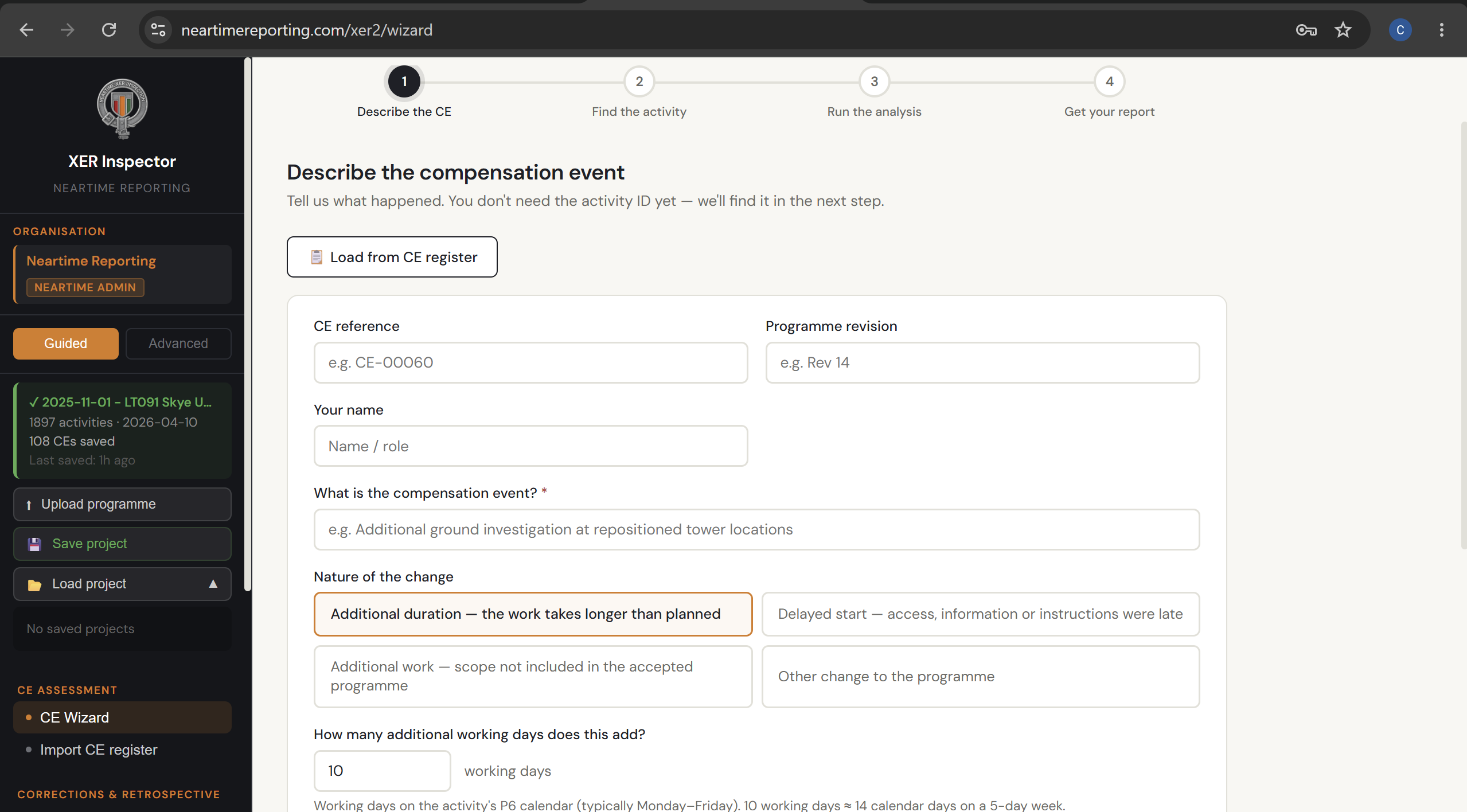
XER Inspector CE Wizard
CE Wizard

Guided four-step assessment — describe the compensation event, find the affected activity, run the analysis, and get your formatted report.

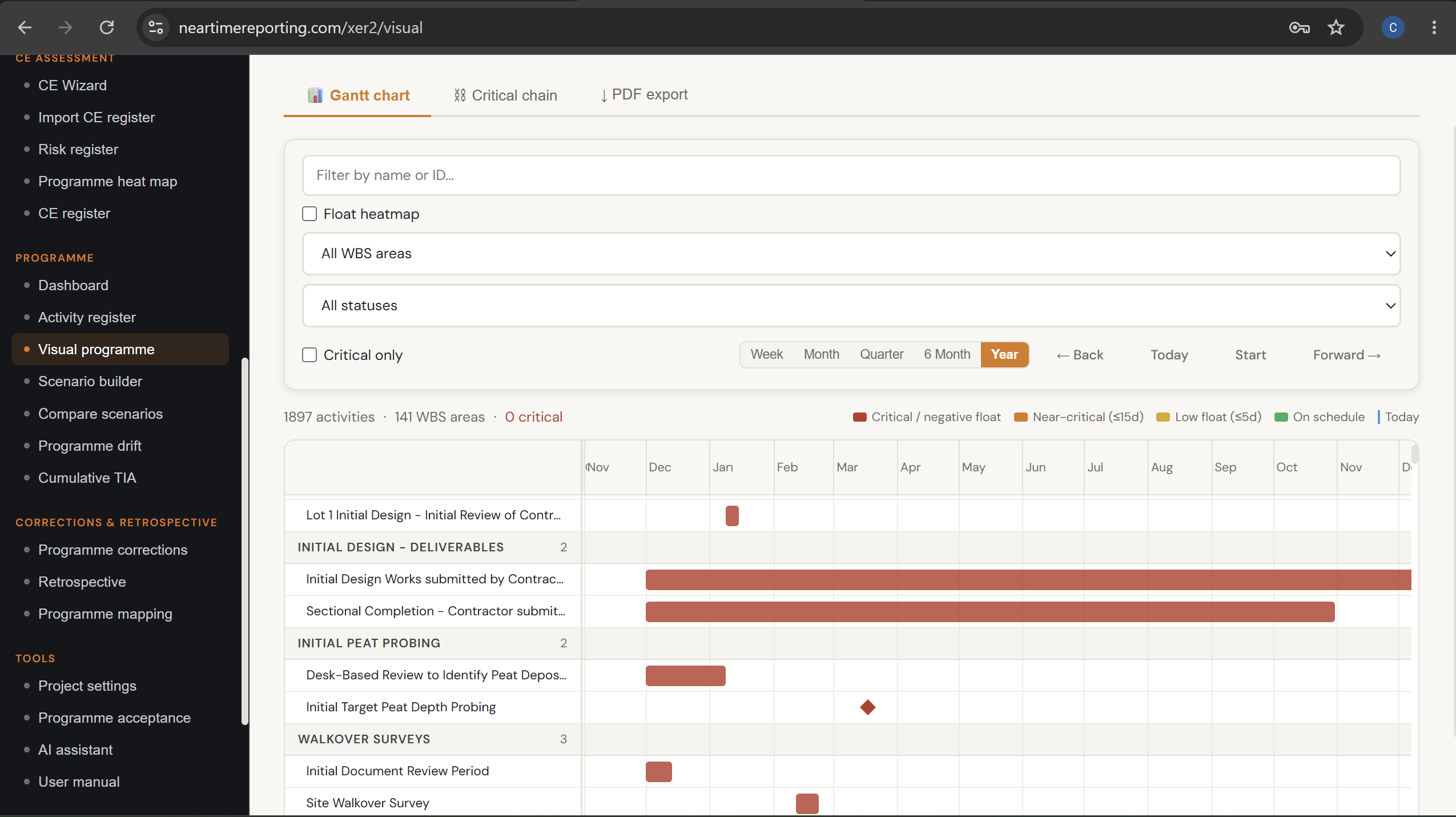
XER Inspector visual programme Gantt chart
Visual Programme & Gantt Chart

Full Gantt chart view with criticality colour-coding, float heatmap, WBS filtering and critical chain analysis across the entire programme.

← Swipe to see more →

Stop asserting impact. Start evidencing it.

Access XER Inspector now or get in touch to discuss how it can support your next CE assessment or TIA.